Wednesday, February 9, 2011

3 Reasons Nonprofits need a facebook page not a profile

I have been asked this question a lot. Here is an article that answers the question of Facebook Page or Facebook Profile very simply, in my opinion.

If you have further questions please ask we want to give back where we can.

Pierre Rattini, Biz Buzz Media, CMO, CCO
Social Media Marketing Consultant, Myrtle Beach SC
http://www.bizbuzzmedia.net

Amplify’d from www.socialbrite.org
Sociabrite


Why you want to create a Facebook Page, not a Profile, for your nonprofit

John HaydonI’ve been chatting with Will Coley lately about nonprofits that violate Facebook’s Terms of Service, sometimes knowingly, by using a Profile to market their cause rather than a Page.
Using a Facebook Profile to market your nonprofit on Facebook is not smart, for at least three reasons:

You have no way of knowing what people want

1Facebook gives marketers a powerful tool called Insights that allows you to see – on a post level – how your fans engage with your content. Profiles don’t have this tool, only Pages do.
Facebook users don’t analyze how their friends react to their status updates. But marketers care very much about this – and so should you.

People don’t want to be your friend

2A friend request is very different from asking someone to like your Page. If you’re sending friend requests as a Profile, you’re asking the user to allow you to see their photos, their friends list, their address, their phone number and perhaps their relationship status.
Gross.
Facebook users don’t want to share this info with your organization. Asking a user to like your Page, on the other hand, doesn’t cross any personal boundary.

Facebook could delete your profile

3Using a Facebook profile to market your organization is a violation of Facebook’s rules.
What this means is that after spending a lot of resources of building up a large amount of friends – say, up to 5,000 – Facebook can simply delete the profile.

A visual map of your Facebook options

It’s likely that most nonprofits that go this route do so simply out of ignorance. The difference between a Profile and a Page is a topic covered in the Facebook Foundations webinar I conduct with CharityHowTo. Above is a map of all properties available on Facebook — Pages, Profiles, Places and Groups — on one slide. You can also download the PDF.
Why else is using a Profile bad business for nonprofits?
Read more at www.socialbrite.org

Enhanced by Zemanta

How Non-Profits can take charge of Facebook news feeds

A must read if you are a non profit. Just Saying!

If you find this helpful or you have other tips to help other non profits please share them.

Pierre Rattini, CMO, CCO
BizBuzzMedia.net
Social Media Marketing Consultant
Amplify’d from www.socialbrite.org
Sociabrite


How nonprofits can take charge of Facebook’s news feeds

EdgeRank-Checker

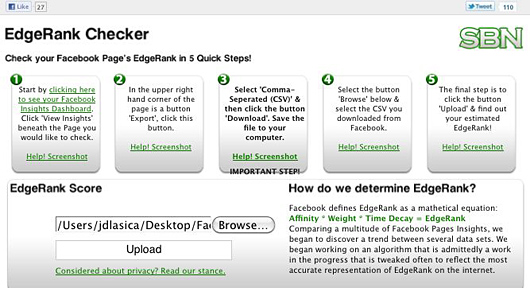
New tool: The EdgeRank Checker app shows how well your Facebook Page is performing.

It’s the heart & soul of Facebook — and few people understand it

JD LasicaOver the years, Facebook has become a central part of our online social presence — for nonprofits, organizations and our personal brands.
So why do so many nonprofits and organizations know so little about how the heart and soul of Facebook actually works? I’m referring to the Facebook News Feed, featured in a Chevy Cruze commercial in the second quarter of yesterday’s Super Bowl.

In this series, we’ll offer tips on how to use Facebook much more effectively as a professional by taking charge of your News Feed. We’ll dissect Facebook’s secret sauce, called EdgeRank, to help you build authority with the right touch, tools and tactics. And we’ll give you tips on how to expand your organization’s reach and influence on Facebook.

How Facebook’s news feeds work

Facebook is far more than a social network: It’s also a personalized news network powered by a highly dynamic engine that’s personalized, relevant and timely. The crown jewel of this dynamic landscape is the News Feed. The News Feed consists of the content continually fed into the center column of your home page from people and Pages you follow on Facebook. You’ll see status updates, photos, photo tags, videos, friend requests, event RSVPs and group memberships.
Facebook’s news feeds have evolved significantly since the first one was introduced in 2006. With close to 600 million members, Facebook handles billions of individualized feeds — an impressive feat of engineering, if you to stop to think about it. Some members may not realize it, but the news stream you typically see on your page displays only a small portion of the updates posted by your Facebook friends.
A few weeks ago Facebook tweaked the Most Recent feed. Now you have the option to display photos, Page updates & posts on Friend Lists.
Your News Feed comes in two flavors:
Top News contains what Facebook calls “the most interesting content that your friends are posting.” This filtered feed is the default view on Facebook (until you change it), and Facebook said in late 2010 that more than 95 percent of its nearly 600 million members using the Web interface see the site through this prism. (This figure doesn’t count members using mobile apps and third-party apps.)
Most Recent shows you “all the actions your friends are making in real-time,” Facebook says (though that’s not literally true, as we’ll see below). On Dec. 22, with little fanfare, Facebook updated the Most Recent feed, giving you more filter options, including just photos, just updates from Pages, and posts from the Friend Lists you create. Pretty cool! Behold:
If you’d prefer to see Most Recent as your default, you can scroll down to the very bottom of your Top News or Most Recent page, click Edit Options, and select: Show posts from: All of your friends and pages. (See this Help page for more details.)
You can also choose to hide certain kinds of applications — if you hate quizzes, you can banish quiz apps from your feed — or you can hide posts from selected individuals or Pages. This can come in handy if you have a garrulous buddy you don’t want to defriend or a brand that you’ve changed your mind about. Roll over the X at the right of any post and you’ll see options, which are different for Pages and friends:
A few things to note about the Most Recent feed:
• If you use the Facebook for iPhone or Facebook for Android app, this is the feed you see — the Live Feed gusher, not the filtered Top News feed.
• Does your Most Recent feed contain absolutely all of your friends’ updates? Well, it probably contains 98 percent of them. At the Daily Beast, Tom Weber conducted an experiment and found that updates, links, photos and videos posted by a Facebook newcomer did not appear in some of his friends’ Most Recent feeds. And others have noticed that the Most Recent feed doesn’t contain a few of the updates you see in the unfiltered Live Feed on your mobile device or a third-party app using an API like TweetDeck or Hootsuite. Try it — it’s an interesting experiment!
• I should also mention that an update by a Facebook Group — as opposed to a Facebook Page or personal Profile — does not appear in either anyone’s Most Recent or Top News feeds. Groups may contact their members via in-box messaging up to a maximum of 5,000 members, which Pages cannot do. But today it’s almost always better for a brand to create a Page, rather than a Group, to maximize visibility within the News Feed.
You may also want to check the settings found by clicking on the “Edit Options” button of your Most Recent feed at the top or bottom of the page.

Fine-tuning your Top News feed

Now, here’s where it gets interesting. We don’t recommend turning your Top News into a Most Recent firehose. The idea behind Top News is this: You want to see news from the Facebook members, brands or causes that matter most to you. And we agree: You want to be selective about who to devote your attention to, especially if you have hundreds or thousands of friends and follow scores of Pages. Your time is valuable, right?
So you need to teach Facebook’s Top News feed how to behave. And you want to set up lists for more targeted updates, which we’ll cover in part 2.
What makes it into your Top News stream? Facebook uses a formula called EdgeRank, which takes into account just three factors:
  • Affinity: The more often you engage with content by a person or Page over time, the higher your affinity will be for that content creator.
  • Weight: As posts are commented on, liked and shared by other Facebook users and their networks, their overall weight increases, even if you’re not connected with those users. A posting with 10 comments and 15 Likes carries a greater weight than one with no comments or Likes. Not all interactions are equal. A comment probably counts more than a Like does.
  • Timeliness: The more recent the post, the higher it ranks. As time goes by, its value decreases.
Top News will show you hours-old updates from some friends while ignoring newer posts from others. You probably wonder which of your friends see which of your posts. It comes down to this: A high EdgeRank leads to visibility while a low EdgeRank leads to obscurity.

New tool: The EdgeRank Checker app

Last week social media strategist Mari Smith wrote about a new tool that measures your Facebook Page’s EdgeRank score. If you have a Facebook Page, EdgeRank Checker — pictured at top — steps you through the process of determining how effective your Page is in reaching your followers. No download necessary.
Here’s how it works. Just log in as an administrator, go to your Insights page and select the Page you want to check (image above). Choose a date range, click the Export button and be sure to tab over to select CSV (not Excel). Then upload the CSV file to EdgeRank Checker and it spits out your score in a few seconds. The resulting page will show what your score means. Facebook expert Chad Wittman, founder of social media management firm SBN, created the tool. There’s also a fan engagement checker at Fangager.com – enter your Page username to get a full summary (hat tip to Brian Solis).
The exact way EdgeRank works is part of Facebook’s secret sauce, but we’ll explore how to increase affinity and weight — that is, how to enhance your influence and visibility — in part 2 of this series.
Read more at www.socialbrite.org

Enhanced by Zemanta

REPORT: Facebook Branding Beats Twitter

Did you see the other article on this subject http://ow.ly/3ThiQ


Why Facebook Matters to your business.


Pierre Rattini

CCO,CMO Biz Buzz Media

Social Media Marketing Consultant

Mobile Marketing, Lead Generation and Automated Follow up

Amplify’d from www.allfacebook.com

Facebook’s brand effectiveness outranks all other social media’s branding efforts, according Brand Keys’ Customer Loyalty Index.

The index measures customer engagement and loyalty among brands in 79 different categories, one of which is social networking sites. This category has enough surprises to make us wonder whether Brand Keys’ assessment used sufficiently sized survey samples.

Brand Keys ranks MySpace second, LinkedIn third, Flickr fourth and Twitter fifth. We’d expect to see Twitter and the old News Corp. site in each other’s places. Or maybe MySpace shouldn’t even be in the top five, as many other sites have stronger brands, including FourSquare, Quora, Tumblr, YouTube and Yelp, not neccessarily in that order.

The consultancy declares that its index can help a brand forecast customer loyalty and purchase patterns over a 12- to 18-month horizon; this confuses us further if it means that MySpace will continue to rank second for another year-and-a-half. We suppose that’s mitigated by the notion that Facebook would continue to rank first over this time.

Readers, what do you make of the Brand Keys assessment of branding in social media?

Read more at www.allfacebook.com